An AI agent that can run code or manipulate files needs a clear boundary around that work. A sandbox provides an isolated environment in which a task can execute with limited access to resources. It is useful for trying code, processing an untrusted file or investigating a problem without giving the agent unrestricted access to the host system.
The word sandbox covers several different technologies. A temporary directory, a container and a virtual machine do not provide identical isolation. The right choice depends on the threats, the platform and the resources the task needs. A sandbox is one layer in a broader design, not a promise that every operation is safe.
Decide What The Sandbox Can Reach
Define the boundary before running the task. Which files are available? Can the process access the network? Are credentials present? How much time, memory and storage may it use? Make these answers explicit and default to the smallest set of permissions that can complete the job.
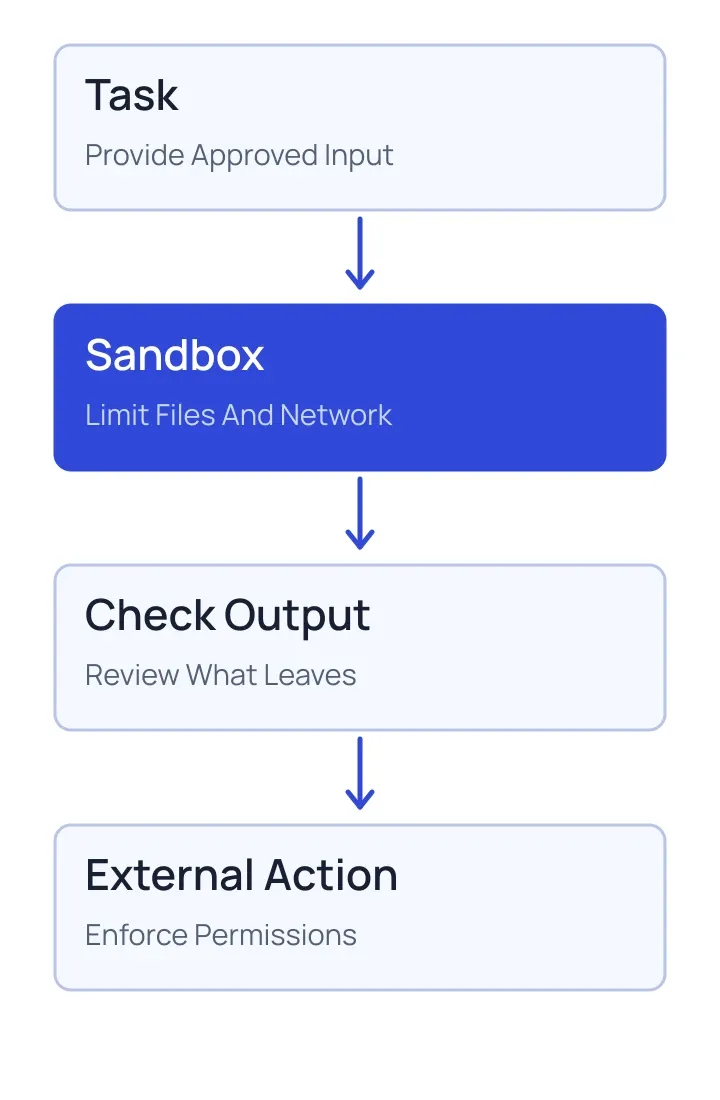
For example, a hypothetical data-cleaning task might receive a copy of an approved input file and write its result to a separate output folder. The process does not need access to the team's entire drive. If a dependency must be downloaded, decide whether that network access is allowed and how it is controlled.
The boundary should cover both reading and writing. Sensitive source data can leak through network requests or output files even when the sandbox prevents changes to the original. Likewise, a generated file can contain harmful code or misleading instructions. Review what leaves the environment and where it will be used.
Separate Tools, Secrets And Side Effects
Do not place broad production credentials inside a general-purpose execution environment. If an agent needs a protected service, give it a narrowly scoped tool that performs the required operation and checks the caller's permissions. A sandboxed process should not be able to grant itself broader access simply by producing a convincing instruction.
External side effects deserve their own controls. A script inside an isolated environment may be harmless until its output is used to update a customer record or deploy a change. Validate inputs and outputs at that boundary, and require human review for actions that warrant approval. Keep the approval specific enough to show what will change.
Plan For Failure And Cleanup
Set practical limits on execution time, processes and storage. Record whether the task completed, failed or was stopped. Remove temporary resources according to a defined retention policy, including any copies of uploaded files. If the process is interrupted, do not assume an external action failed; check the target system before retrying.
Test boundaries rather than relying on their names. Attempt representative unauthorized file reads, outbound connections and resource-intensive tasks in a controlled test environment. Review the isolation guarantees and configuration of the chosen platform. Updates to images, dependencies and execution infrastructure should be part of regular maintenance.
Use Sandboxing With Other Controls
Sandboxing is valuable when an agent handles unfamiliar code or documents, but it does not resolve every risk. Prompt injection can still influence a model, and a permitted tool can still be misused if its authorization is too broad. Combine isolation with narrowly scoped tools, input validation, observation and review.
For more on treating external instructions as untrusted, read prompt injection in AI agents. To investigate what happened during a run, see AI agent observability.