A computer use agent works with a visual interface: it observes a screen, chooses an action and checks what changed. That can make it useful when a workflow depends on an application that has no suitable integration. It also means the agent must deal with the same uncertainty a person sees: loading screens, changed layouts, ambiguous buttons and unexpected dialogs.
Computer use is a way to interact with software, not a guarantee that a task was completed. A click can miss its target; a page can show an error after a form is submitted. The workflow needs to verify the outcome, especially when an action changes data or affects another person.
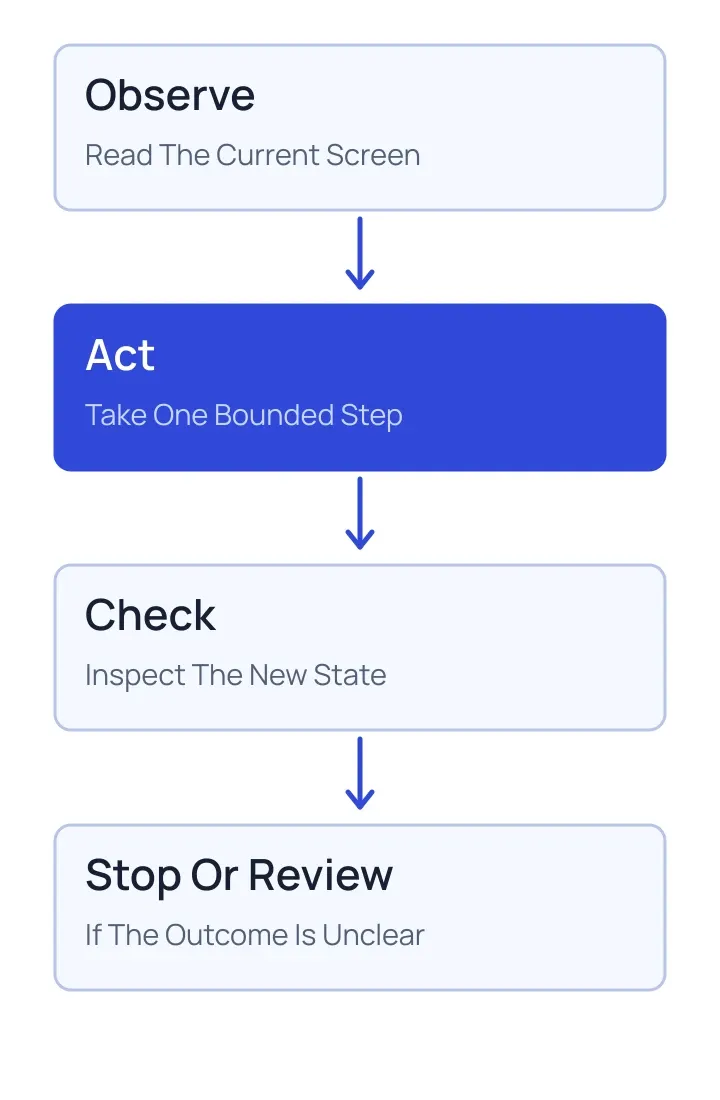
The Observe, Act And Check Loop
The agent starts with a view of the current interface and the user's goal. It decides on one bounded action, such as opening a menu, and then inspects the resulting state. That feedback guides the next step. The loop continues until the task is complete, needs human input or cannot proceed safely.
Imagine gathering details from an internal dashboard. The agent could open the relevant report, select a date range and read the displayed totals. It should verify that the report and date range actually changed before using the figures. If a login prompt or access error appears, it should report that condition instead of guessing what the dashboard contains.
When A Visual Interface Makes Sense
Visual interaction can help with legacy applications, complex review workflows and tasks that depend on the current state of a screen. It is especially helpful when a person must inspect the same interface before accepting a result.
A documented API is often more predictable for structured reads and writes. It can return explicit errors, validate inputs and offer clearer permissions. Where both approaches are available, use the interface that fits the job and can be checked reliably. Some workflows use an API for data retrieval and a visual interface for a final review.
Design Around Errors And Sensitive Actions
Give the agent only the access needed for its task. Keep account boundaries clear and avoid placing secrets in screenshots, logs or summaries. Treat content displayed on a page as potentially untrusted: a web page can contain instructions that conflict with the user's request. Those instructions do not grant permission to take a different action.
Classify actions by consequence. Reading a public page and submitting a payment do not need the same controls. Require an explicit approval where a consequential action calls for one, and show enough detail for the reviewer to understand what will happen. A confirmation screen should include the actual recipient, amount or record where applicable, not just a generic success message.
Stopping is part of the design. Unexpected authentication prompts, ambiguous destructive controls and repeated failures should lead to a clear handoff. Do not repeatedly retry a submission when the first attempt may already have succeeded; inspect the resulting record or ask for review.
Evaluate The Whole Task
Test with realistic screens and interruptions rather than a single perfect path. Include slow loading, a changed button label, an empty result and a session that has expired. Check both whether the correct outcome was reached and whether the agent stayed within its authorized scope. Save enough evidence to understand a failure without collecting unnecessary sensitive content.
For more on testing permitted actions, see AI agent evaluations. The OpenAI guide to building agents provides additional background on agent workflows and tools.