
An AI agent can have access to many tools and still struggle with a routine task. It may not know which procedure applies, which reference file to consult, or what a satisfactory result should contain. An agent skill packages that practical guidance so it can be selected when relevant instead of repeating every instruction in every request.
A skill is a reusable set of instructions and, where useful, supporting files or scripts. A task description helps the agent find the right skill; the fuller guidance is loaded when needed. For example, a team might maintain a skill for checking a release checklist, including the checklist itself and the evidence expected at each step.
How A Skill Fits Into An Agent Workflow
A typical sequence begins with a user request. The agent reviews the available skills, selects one that matches, reads its instructions and follows the relevant steps. It may then consult an included reference or use an available tool. The result should still be checked against the original request.
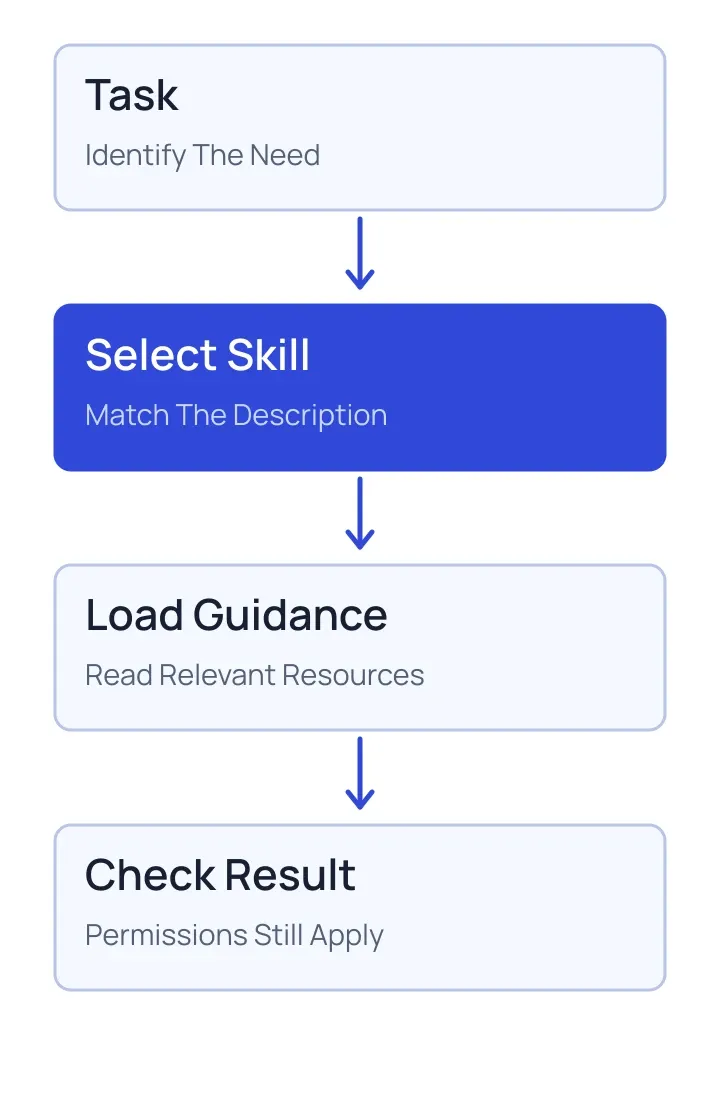
The distinction between discovery and use matters. A concise description makes a skill easier to select; it does not need to contain the entire procedure. Detailed guidance can remain in the skill until the task calls for it. The Agent Skills specification describes a portable format for this kind of package.
What Belongs In A Useful Skill
Start with a narrow job and a clear trigger. Describe the inputs the agent needs, the decisions it should make and the shape of the output. Put lengthy references in separate files that can be read at the appropriate point. If a script is included, explain its purpose and the conditions under which it is safe to run.
Consider a hypothetical support team that prepares a weekly issue summary. Its skill could explain how to group recurring issues, distinguish confirmed findings from assumptions and link back to source records. It should also say what to do when a source is missing. A short example of a good summary may help more than a long list of vague adjectives.
Avoid encoding information that changes often without an owner. A stale approval rule or outdated link can make a polished procedure unreliable. Record who maintains the skill internally, review it when the underlying workflow changes and keep changes traceable.
Skills Do Not Grant Permission
A skill can tell an agent how to approach a task, but instructions are not an access control. The application still needs to enforce which files, accounts and tools a user may use. An instruction to send a message, change a record or expose a document must not override the user's permissions or an approval requirement.
Treat unfamiliar skills and their bundled files as software from a third party: inspect their source, understand any scripts and decide whether they are appropriate for the environment. Restrict secrets and network access independently. When a skill quotes external content, treat that content as data, not a new instruction to the agent.
Test The Task, Not Just The Format
Test with ordinary requests, incomplete requests and cases that should not trigger the skill. Check whether the agent chooses the right guidance, asks for missing information when necessary and produces a useful result. Include a case in which a requested action is outside the user's permissions. Re-run these examples when the skill or its tools change.
A good starting point is one frequently repeated task with a stable definition of success. Compare the results with and without the skill, then adjust the guidance based on observed failures. For a wider view of what enters the model's working context, read our guide to context engineering. For ways to measure the resulting workflow, see AI agent evaluations.